

ToFu • Informational / Operations Guide • Pillar:
Ace Packman
If you sell or source Ace Packman Wholesale assortments, most preventable costs come from confusion: “same name, different version,” mixed cartons, wrong picks, and unclear restock requests. This guide shows a practical SKU architecture that keeps variants readable for humans and unambiguous for systems—without sounding salesy.
Quick internal orientation (not a sales pitch)
These internal pages are useful for defining the “family” and cross-checking variant language:
For operational controls supporting this article’s topic: Ace x Packman change control packman x ace 2g packaging & labeling
1) Why SKU architecture matters in Ace Packman wholesale
A clean SKU architecture reduces four common wholesale pains:
- Wrong picks: two variants sound similar, so warehouse picks the wrong one.
- Reorder ambiguity: a buyer requests “the same one as last time,” but the description is vague.
- Mixed-version shipping: “same SKU” arrives with different artwork or pack-out, triggering disputes.
- RMA noise: returns get classified by guesswork, so the same issue repeats.
SKU architecture is not “more paperwork.” It’s a compact language that lets purchasing, QC, warehouse, and support communicate without misinterpretation.
2) The “MVSA” field set (minimum viable SKU architecture)
MVSA keeps the SKU short while still uniquely identifying the variant. Start with 6–8 fields max and keep them in a fixed order.
| Field | Purpose | Example |
|---|---|---|
| Brand / Pillar | Locks the family (Ace Packman) | ACEPACKMAN |
| Format | Separates disposable vs other formats | DISPO |
| Capacity | Prevents “same name, different size” errors | 2G / 1G |
| Generation | Stabilizes “V1 vs V2” type differences | V2 |
| Key feature | Identifies the most visible differentiator | SCREEN |
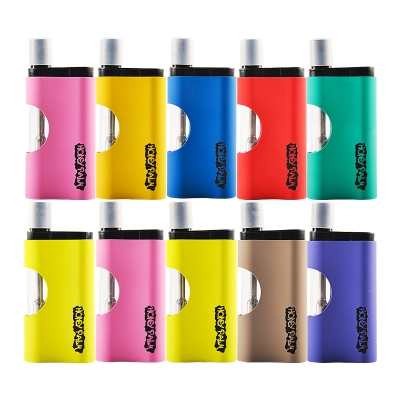
| Finish / Color | Separates colorways (often drives picking errors) | GLD, BLK |
| Case pack | Connects SKU to carton reality | 200, 500 |
| Revision (optional) | Controls artwork/spec changes without renaming everything | R01, R02 |
3) Naming rules: human-readable vs system SKU
Use two names for every item:
- Display Name (human): what buyers and support will read in messages.
- Internal SKU (system): what purchasing/WMS/ERP uses to prevent ambiguity.
Recommended formats
Keep the internal SKU as a predictable “sentence” with fixed field order:
ACEPACKMAN-DISPO-[CAP]-[GEN]-[FEATURE]-[FINISH]-[PACK]
| Display Name | Internal SKU | Why it works |
|---|---|---|
| Ace Packman V2 2G Screen Gold | ACEPACKMAN-DISPO-2G-V2-SCREEN-GLD-200 |
Capacity + generation + feature prevent “close variant” mixups. |
| Ace Packman V1 1G LED Black | ACEPACKMAN-DISPO-1G-V1-LED-BLK-500 |
Pack is explicit, so carton configuration can’t be assumed. |
4) Case packs and pack-out: where mistakes start
In wholesale operations, the “product” is not only the unit—it’s also the pack-out: how many units per inner box, how many inners per master carton, and whether cartons are mixed or single-variant.
Make case pack a first-class field
- If a variant can ship as 200 or 500 units per carton, treat them as distinct pack configurations.
- Don’t let “same name” imply different carton sizes—this is a classic receiving dispute trigger.
case_pack) and mirror it in the SKU suffix (e.g., -200).5) Reorder codes buyers actually use
A reorder code is a short string that a buyer can message to your team without rewriting a long description. It should map one-to-one to the internal SKU.
Recommended reorder-code format
AP-[CAP]-[GEN]-[FEATURE]-[FINISH]-[PACK] ("AP" = Ace Packman)
| Internal SKU | Reorder Code | Use case |
|---|---|---|
ACEPACKMAN-DISPO-2G-V2-SCREEN-GLD-200 |
AP-2G-V2-SCR-GLD-200 |
Fast restocks; prevents “gold screen 2g” ambiguity. |
ACEPACKMAN-DISPO-1G-V1-LED-BLK-500 |
AP-1G-V1-LED-BLK-500 |
Bundles pack-out into the code so cartons don’t get mixed. |
6) Revision control: stop “same SKU, new look” disputes
The fastest way to lose trust in a wholesale program is shipping mixed artwork or pack-out under a single SKU name. You don’t need bureaucracy—just a baseline and a rule for what triggers a revision.
Three change buckets (simple but effective)
| Change type | Examples | Rule |
|---|---|---|
| Minor | Typos, small layout shifts that do not affect scanning or variant identification | New revision label only if it impacts receiving or customer recognition. |
| Major | New artwork version, label placement changes, carton markings updated | Revision update required; keep lots separated by revision. |
| Critical | Anything that can cause wrong pick, wrong variant, or disputes | Block mixed shipments; require an approval step and new evidence pack. |
If you want a deeper operational workflow for this, reference: (internal) “Ace x Packman change control” and “packman x ace 2g packaging & labeling” in the top section of this article.
7) Labeling and carton logic (unit → inner → master)
Your SKU architecture becomes “real” only when the carton labels carry the same logic. A clean label system is how warehouse accuracy scales.
Minimum label elements (ToFu-friendly, operational)
- Variant ID: internal SKU or reorder code (ideally both).
- Case pack: explicit unit count per carton.
- Lot reference: enough to link cartons to receiving records.
- Revision: if you run artwork/pack-out revisions.
8) Copy/paste templates (tables you can reuse)
8.1 Single-sheet “SKU Bible” template
| Display Name | Internal SKU | Reorder Code | Case Pack | Revision | Notes |
|---|---|---|---|---|---|
| Ace Packman V2 2G Screen Gold | ACEPACKMAN-DISPO-2G-V2-SCREEN-GLD-200 |
AP-2G-V2-SCR-GLD-200 |
200 | R01 | Use for training + receiving checks |
| Ace Packman V1 1G LED Black | ACEPACKMAN-DISPO-1G-V1-LED-BLK-500 |
AP-1G-V1-LED-BLK-500 |
500 | R01 | Keep cartons by revision and lot |
8.2 Field dictionary (prevents “everyone invents their own terms”)
| Term | Definition | Owner |
|---|---|---|
| Variant | A unique configuration within the Ace Packman family (capacity/generation/feature/finish) | Product ops |
| Case pack | Units per master carton (do not assume; always label) | Warehouse ops |
| Reorder code | Short buyer-facing code that maps 1:1 to internal SKU | Sales ops / support |
| Revision | Controlled change label for artwork/pack-out/spec updates | QA / change control |
9) Implementation plan (2 hours to get baseline)
- Pick your MVSA fields (6–8 fields max) and lock the field order.
- Define allowed values (e.g., V1/V2 only; SCREEN/LED only; GLD/BLK/SLV).
- Create the SKU Bible sheet (Display Name → SKU → Reorder Code → Case pack → Revision).
- Label sanity check: make sure cartons visibly show case pack + variant ID.
- Revision rule: decide what changes trigger a new revision label.
10) FAQ
Is “Ace Packman Wholesale” a SKU or a category label?
Treat it as a category label (and a search keyword). The SKU should be the exact, unambiguous string that separates each variant and pack-out.
Should capacity (1g vs 2g) always be in the SKU?
Yes. Capacity is one of the highest-risk fields for wrong picks and reorder confusion—include it in both display name and internal SKU.
Do I need to add every possible feature into the SKU?
No. Encode only the differentiators that change picking, customer recognition, or carton labeling. Keep the rest in a spec sheet or variant notes.
11) Standards & references (external, no battery focus)
These references support the labeling, barcode placement, identification, revision control, and packaging durability concepts used in this guide:
- GS1 US: Barcode placement & quiet zone basics
- GS1: Logistic Label Guideline (overview)
- GS1: Logistic Label Guideline (PDF)
- GS1: GTIN Management Decision-Support Tool
- GS1: GTIN Management Standard (PDF)
- ISTA: Test Procedures (Procedure 3A overview)
- ASTM: D4169 Performance Testing of Shipping Units
- ISO: Guidance on documented information (supports revision/document control concepts)






3 Comments
This was helpful. Appreciate the update!
Clear and easy to follow. Good job.
Really nice post, thanks for sharing!